If you have ever worked with images, graphic design, printing, photography, or website layouts, you have probably encountered terms such as pixels, DPI, and PPI. But how many pixels are actually in one inch? The answer depends on how pixels are being measured and where the image is being displayed.

What Is a Pixel?
A pixel, short for “picture element,” is one of the smallest individual units that make up a digital image or display. A photograph on a computer screen, smartphone, or website is made up of many tiny pixels arranged horizontally and vertically.
For example, an image that is 1920 pixels wide and 1080 pixels high has 2,073,600 pixels in total. The pixel dimensions tell you how much digital information the image contains, but they do not automatically tell you its physical size in inches.
So, How Many Pixels Are in an Inch?
There is no single universal number of pixels in one inch. The number depends on the pixel density of the display or image.
When discussing digital images, PPI (pixels per inch) is the measurement commonly used to describe pixel density. If a display has a density of 100 PPI, it contains approximately 100 pixels across every physical inch.
For example, if an image is 1200 pixels wide and is displayed at 100 PPI, its physical width would be approximately:
What Does 96 PPI Mean?
You may have heard that one inch equals 96 pixels. This idea comes from the historical use of 96 CSS pixels per inch as a reference for web and computer interfaces.
However, this does not mean that every modern monitor physically contains exactly 96 pixels in one inch. Modern displays can have much higher pixel densities, including displays with 150, 200, 300, or more PPI.
What Is PPI?
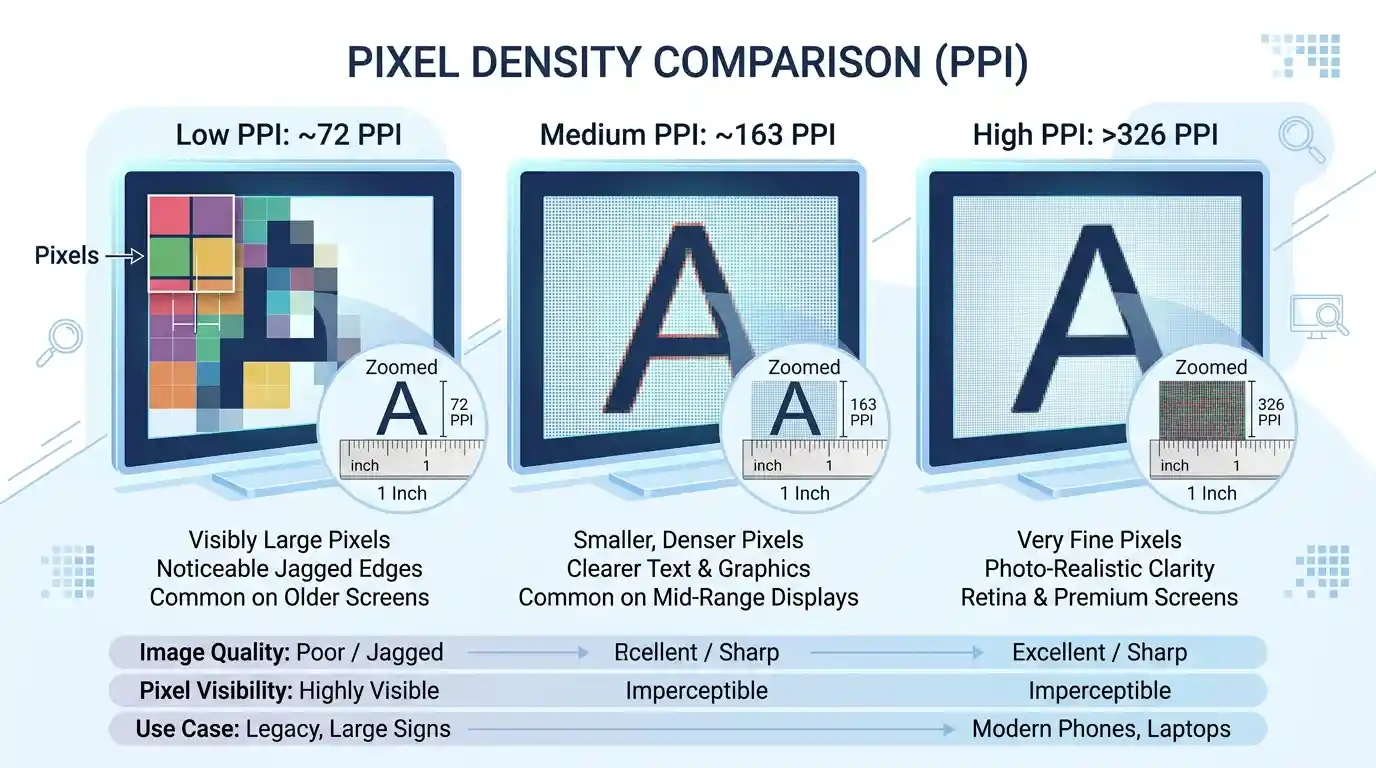
PPI stands for pixels per inch. It describes how many pixels are packed into one physical inch of a digital display or image.
A higher PPI means that more pixels are concentrated within the same physical area. This can allow images and text to appear sharper and more detailed, assuming the content and display quality are appropriate.
Low PPI
Fewer pixels are packed into each physical inch. Individual pixels may be easier to distinguish at close viewing distances.
Medium PPI
A moderate pixel density can provide a balance between display size, resolution, and image detail.
High PPI
More pixels are packed into each inch, potentially producing finer details and smoother edges.
What Is DPI?
DPI stands for dots per inch. It is primarily associated with physical printing and describes how many individual dots a printer can place within one inch.
DPI and PPI are often used interchangeably in everyday conversations, but they describe different things. PPI relates to pixels in digital images or displays, while DPI relates to physical printed dots.
PPI vs DPI: What’s the Difference?
| Feature | PPI | DPI |
|---|---|---|
| Full form | Pixels Per Inch | Dots Per Inch |
| Commonly associated with | Digital images and displays | Printers and physical output |
| Measures | Pixel density | Printed dot density |
| Example | 300 PPI image | 600 DPI printer |
How to Calculate Pixels From Inches
If you know the physical size and PPI, you can calculate the approximate number of pixels required for an image.
For example, suppose you want an image that is 8 inches wide at 300 PPI:
Therefore, an image intended to be 8 inches wide at 300 PPI would need approximately 2,400 pixels across its width.

How to Calculate Inches From Pixels
You can also calculate physical dimensions when you know the number of pixels and the PPI.
For example, an image that is 1800 pixels wide at 300 PPI would have a theoretical physical width of:
Common Pixel-to-Inch Examples
| Pixels | PPI | Approx. Width |
|---|---|---|
| 96 px | 96 PPI | 1 inch |
| 300 px | 300 PPI | 1 inch |
| 600 px | 300 PPI | 2 inches |
| 1200 px | 300 PPI | 4 inches |
| 2400 px | 300 PPI | 8 inches |
Why Pixel Density Matters
Pixel density becomes especially important when you are preparing images for printing, designing graphics, creating digital artwork, or optimizing images for different displays.
A digital image can have a large number of pixels but still appear at different physical sizes depending on the PPI setting or output device. Therefore, pixel dimensions and physical dimensions should be considered separately.
For Digital Displays
When designing for websites and applications, the actual CSS dimensions and responsive layout are usually more important than assigning a physical inch measurement to an image.
For Printing
For printed materials, both the desired physical dimensions and the image resolution matter. For example, an image intended for a high-quality print may require considerably more pixels than an image displayed at a relatively small size on a website.
Quick Way to Remember PPI and DPI
PPI = Digital Pixels
Think of PPI when discussing pixels in digital images and displays.
DPI = Printed Dots
Think of DPI when discussing the dots produced by a printer.
Pixels Don’t Have a Fixed Physical Size
A pixel’s physical size depends on the pixel density of the display or output system.
Conclusion
So, how many pixels are in an inch? There is no universal answer. The number depends on the pixel density being used. PPI describes how many pixels are packed into each physical inch, while DPI generally describes the density of printed dots.
The basic formulas are simple: Pixels = Inches × PPI and Inches = Pixels ÷ PPI. Understanding these relationships can help you prepare images correctly for websites, screens, graphic design projects, and printing.
Frequently Asked Questions
Here are some common questions about pixels, inches, PPI, and DPI.
There is no universal number of pixels in one inch. It depends on the pixel density. For example, at 96 PPI, one inch corresponds to 96 pixels, while at 300 PPI, one inch corresponds to 300 pixels.
No. PPI means pixels per inch and is commonly used for digital images and displays. DPI means dots per inch and is primarily associated with physical printing. The terms are often confused because both describe a density per inch.
It depends on the PPI you choose. At 300 PPI, a one-inch image would be 300 pixels wide. At 96 PPI, it would be 96 pixels wide.
Not necessarily. Higher PPI can provide more pixel detail when the source image contains enough information, but image quality also depends on the original image, display, viewing distance, printing process, and other factors.